Pointing Claude Code at 'That Button' with data-testid and a Bookmarklet
I came up as a server developer, but once I started leaning on Claude Code in earnest, I found myself reaching into frontend work and full-stack system development. The friction I hit most often along the way was this.
“On the main page, that little X button next to the search button — change its color a bit.” Say that, and Claude has no way of knowing which file, which component. So either I go find the location myself and hand it over, or Claude flails for a while and ends up touching the wrong thing. One of the two.
The same thing kept repeating, and the wasted time bothered me, so I cleaned up the setup. It is not a grand change, but the compounding effect is not small.
First, a data-testid Convention
The approach itself is simple. Give each component a data-testid="...", and direct Claude by that testid.
<button data-testid="search-clear-btn">×</button>With that in place, one line of chat settles it.
“
data-testid="search-clear-btn"is too large, shrink it a bit.”
No need to describe the location, no confusion over selectors, and Claude lands on it exactly the first time. Since e2e tests use testid anyway, you get two birds with one stone.
But 100 Components Means 100 testids
Assigning testids is good in itself. The problem is that as components multiply, you eventually forget what was added where. That leads back to the chore of checking the code again, and in that moment you are right back at the original problem. “Where was that thing again?” → search the code → time lost all over again.
What I want is simple. While I am looking at that component in the browser, I just point at it with the mouse and the testid surfaces instantly.
So I Built a Bookmarklet
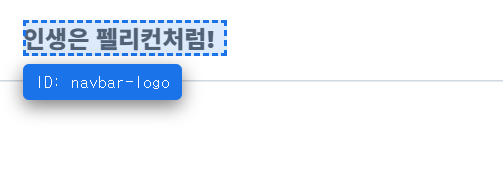
You watch the screen, hover a component, and its testid shows up; click it, and data-testid="..." is copied to the clipboard. ESC to quit.
javascript:(function () {
  // Already active → toggle off
  if (window.__tidActive && window.__tidStop) {
    window.__tidStop();
    return;
  }
  window.__tidActive = true;

  // Hover overlay (blue dashed box)
  var ov = document.createElement('div');
  Object.assign(ov.style, {
    position: 'fixed', pointerEvents: 'none', zIndex: '2147483647',
    border: '2px dashed #1a73e8',
    background: 'rgba(26,115,232,0.15)',
    boxSizing: 'border-box', transition: 'all 0.05s ease'
  });
  document.body.appendChild(ov);

  // ID tooltip
  var tip = document.createElement('div');
  Object.assign(tip.style, {
    position: 'fixed', zIndex: '2147483647',
    background: '#1a1a2e', color: '#fff',
    padding: '4px 8px', borderRadius: '4px',
    fontSize: '11px', fontFamily: 'monospace',
    pointerEvents: 'none', whiteSpace: 'nowrap',
    boxShadow: '0 4px 12px rgba(0,0,0,0.5)'
  });
  document.body.appendChild(tip);

  var cur = null;

  // Walk up to the closest ancestor with data-testid
  function findTid(el) {
    while (el && el !== document.documentElement) {
      if (el.getAttribute && el.getAttribute('data-testid')) return el;
      el = el.parentElement;
    }
    return null;
  }

  // Mouse move → reposition overlay & tooltip
  function onMove(e) {
    cur = findTid(e.target) || e.target;
    var r = cur.getBoundingClientRect();
    Object.assign(ov.style, {
      top: r.top + 'px', left: r.left + 'px',
      width: r.width + 'px', height: r.height + 'px'
    });

    var tid = cur.getAttribute('data-testid');
    tip.textContent = tid ? 'ID: ' + tid : '(data-testid 없음)';
    tip.style.background = tid ? '#1a73e8' : '#444';

    var tx = r.left, ty = r.top - 24;
    if (ty < 5) ty = r.bottom + 5;
    if (tx + tip.offsetWidth > window.innerWidth) {
      tx = window.innerWidth - tip.offsetWidth - 5;
    }
    tip.style.left = tx + 'px';
    tip.style.top = ty + 'px';
  }

  // Clipboard fallback (execCommand)
  function copyText(s) {
    try {
      var ta = document.createElement('textarea');
      ta.value = s;
      ta.style.position = 'fixed';
      ta.style.opacity = '0';
      document.body.appendChild(ta);
      ta.focus(); ta.select();
      var ok = document.execCommand('copy');
      document.body.removeChild(ta);
      return ok;
    } catch (e) { return false; }
  }

  // Click → copy testid → stop
  function onClick(e) {
    e.preventDefault();
    e.stopPropagation();
    var tid = cur && cur.getAttribute('data-testid');
    var stopNow = function () {
      try { window.__tidStop && window.__tidStop(); } catch (e) {}
    };
    if (!tid) {
      showToast('❌ data-testid 없음');
      stopNow();
      return;
    }
    var s = 'data-testid="' + tid + '"';
    var done = function (ok) {
      showToast((ok ? '✓ 복사됨: ' : '⚠ 복사실패(수동복사): ') + s);
      stopNow();
    };
    if (navigator.clipboard && window.isSecureContext) {
      navigator.clipboard.writeText(s).then(
        function () { done(true); },
        function () { done(copyText(s)); }
      );
    } else {
      done(copyText(s));
    }
  }

  // ESC → stop
  function onKey(e) { if (e.key === 'Escape') window.__tidStop(); }

  // Toast
  function showToast(msg) {
    var toast = document.createElement('div');
    toast.textContent = msg;
    Object.assign(toast.style, {
      position: 'fixed', bottom: '20px', left: '50%',
      transform: 'translateX(-50%)',
      background: '#059669', color: '#fff',
      padding: '10px 20px', borderRadius: '8px',
      fontSize: '13px', fontFamily: 'monospace',
      zIndex: '2147483647', pointerEvents: 'auto',
      userSelect: 'text', maxWidth: '80vw', wordBreak: 'break-all'
    });
    document.body.appendChild(toast);
    setTimeout(function () { toast.remove(); }, 4000);
  }

  // Stop function (exposed globally so re-invocation toggles off)
  window.__tidStop = function () {
    document.removeEventListener('mouseover', onMove, true);
    document.removeEventListener('click', onClick, true);
    document.removeEventListener('keydown', onKey, true);
    ov.remove(); tip.remove();
    window.__tidActive = false;
    window.__tidStop = null;
  };

  document.addEventListener('mouseover', onMove, true);
  document.addEventListener('click', onClick, true);
  document.addEventListener('keydown', onKey, true);
  showToast('🚀 TestID Picker ON');
})();
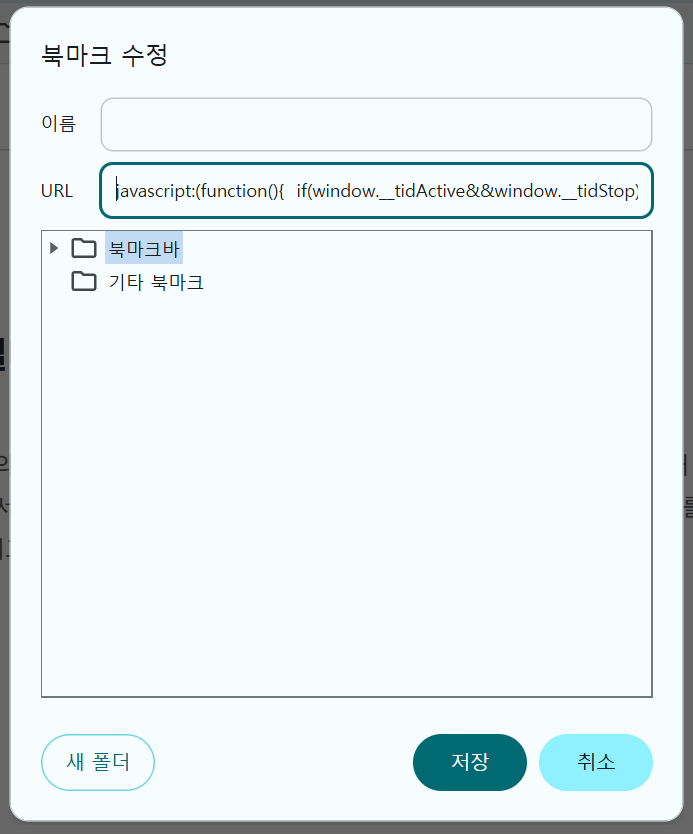
Paste the whole thing, verbatim, into the bookmark URL field. Modern browsers ignore the whitespace and line breaks inside a javascript: URL, so you can leave it nicely formatted without affecting behavior.
Installation is simple. Create a new bookmark in your browser, paste the code above wholesale (including the leading javascript:) into the URL field, and name it something like “TestID Picker.”
The usage flow is as follows.
- With the page you want to work on open, click that bookmark.
- When the “TestID Picker ON” toast appears, activation is done.
- A blue dashed box follows the mouse, and elements that carry a testid show the ID above the box.
- Click a component and
data-testid="..."is copied to the clipboard automatically. - ESC to quit. Then paste it straight into chat and give the instruction.
On hover it walks up to the nearest parent that has a data-testid, so you do not have to aim precisely at the inner text or icon.
Conventions for the Setup
For this flow to pay off, the testids have to be in place beforehand. Adding them after the fact is always a hassle, so I lay down the following rules from the very start of a project.
- Interactive elements (buttons, form inputs, links): give them a testid without exception.
- Naming rule: use the
area-roleform. For example,navbar-search,cart-checkout-btn. - Containers and cards: only the meaningful ones. Tagging everything just becomes noise.
Library components like shadcn/ui can be hard to give a testid to directly. In those cases I wrap them in a single wrapper div and put the testid there.
Static Sites: Work Around It with Runtime Injection
When you cannot easily put testids directly into the build output — as with this very blog (Hugo + Hextra theme) — assigning them automatically at runtime via JS becomes the alternative. You drop a small script at the end of body (or end of head) and, on DOMContentLoaded, map selectors to attach testids.
That is what I did for this blog. A single snippet of script in layouts/_partials/custom/head-end.html is the whole of it. When a page loads, testids like navbar, sidebar, footer, post-title, and heading-h2-... are attached automatically. Run the bookmarklet above on this very post page and it works immediately.
Closing
This is not a new idea. testid is a pattern originally used in e2e testing, and the bookmarklet is just a familiar helper in a different shape.
Still, in the context of pair coding with Claude Code, the fact that “where” gets resolved in under a second compounds into a surprisingly large difference. Jotting a one-line testid convention into the README when starting a new project, and keeping the bookmarklet parked in the bookmark bar at all times — that much is fair to call a small but solid baseline setup.
댓글 0